
AI tools for teachers grading and lesson planning became a real conversation in my family after my sister, who teaches high school English, admitted she was spending her entire Sunday grading a stack of essays instead of doing literally anything else. Thirty-two students, five paragraphs each, and she was reading every single one word for word, writing the same feedback about thesis statements over and over by hand.
That’s not a sustainability problem you can fix by just working faster. It’s a volume problem. One teacher, thirty-two essays, one weekend, and the actual quality of her feedback was dropping by essay twenty-five simply because she was exhausted, not because she cared less.

She’d heard other teachers mention using AI tools for teachers grading and lesson planning, but was skeptical it could handle something as nuanced as evaluating a student’s actual writing, not just checking multiple-choice answers. That skepticism is exactly what got us testing this together properly, rather than her just assuming it either worked perfectly or not at all.
This isn’t a generic “AI for education” listicle. It’s what we actually found testing these tools against her real grading pile and real lesson prep, including where the tools genuinely helped and where they clearly couldn’t replace her judgment.
Why This Is Genuinely Different From Other AI Productivity Use Cases
Most AI productivity advice assumes fairly low-stakes output — a draft email, a meeting summary, a first-pass outline. Grading and lesson planning are higher-stakes in a specific way: a wrong or lazy AI-assisted grade affects a real student’s actual outcome, not just an internal team’s efficiency.
AI tools for teachers grading and lesson planning need to be evaluated with that in mind. The goal isn’t replacing a teacher’s judgment — it’s removing the repetitive, mechanical parts of the workload so the judgment that’s left gets applied with more actual attention, not spread thin across thirty-two nearly identical essays.
The lesson planning side is a genuinely different problem from grading, and it’s worth treating separately, since the tools that help with one don’t necessarily help with the other. That distinction is really the foundation for choosing the right AI tools for teachers grading and lesson planning rather than assuming one tool covers both jobs equally well.
What Actually Matters When Choosing These Tools
Before getting into specific tools, it’s worth being clear about what genuinely matters for a teacher’s real workload, since it’s different from a general productivity checklist.
Consistency in feedback, so the same quality of writing gets similar feedback regardless of whether it’s essay number two or essay number thirty, which is exactly the problem that started this whole search into AI tools for teachers grading and lesson planning.
Time actually saved, not just theoretically saved. A tool that requires as much setup and review time as manual grading isn’t actually helping, even if it looks impressive in a demo — a real test any list of AI tools for teachers grading and lesson planning should be held to.
Alignment with actual rubrics, since generic AI feedback that ignores a specific class’s grading criteria creates more correction work than it saves — a common failure point among generic AI tools for teachers grading and lesson planning that weren’t built with real classroom rubrics in mind.
Genuine data privacy for student work, since student writing and grades are sensitive information, and not every AI tool handles this appropriately for a school environment — this alone rules out several otherwise-capable AI tools for teachers grading and lesson planning.
The Tools Worth Actually Considering
These are the specific AI tools for teachers grading and lesson planning that came up repeatedly while testing this with my sister’s real workload.
1. Grammarly for Education
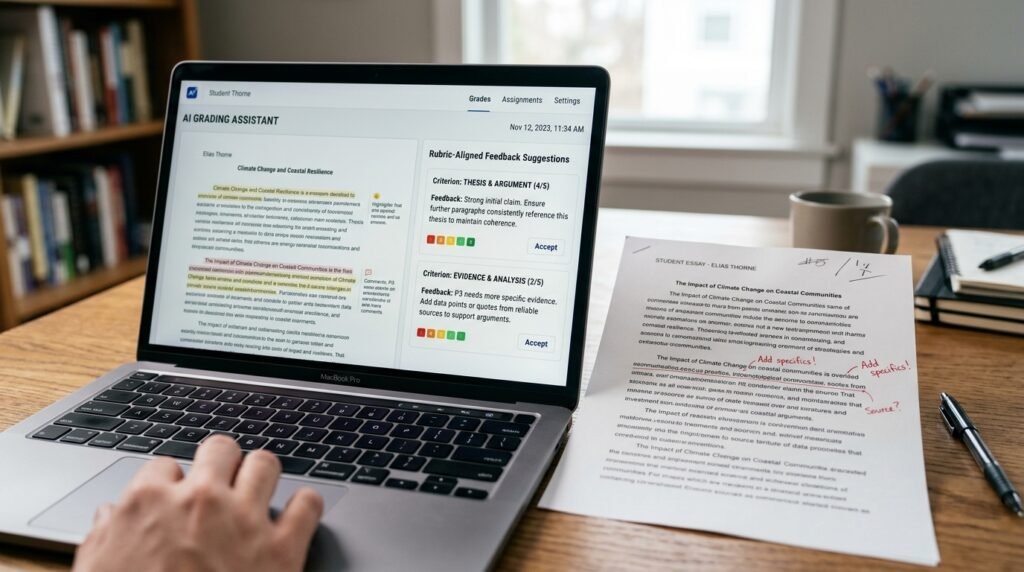
Grammarly’s education-focused tier goes beyond basic grammar checking, offering rubric-aligned feedback suggestions that a teacher can review and adjust rather than blindly accept. For catching the same recurring surface-level issues — comma splices, run-ons, basic clarity problems — across a large stack of essays, this genuinely sped up the first pass significantly.
My sister used this specifically to handle the mechanical feedback layer, freeing her actual reading time to focus on argument quality and structure, which is exactly the kind of judgment an AI tool genuinely can’t replace — the clearest illustration of what good AI tools for teachers grading and lesson planning should actually do.
2. Brisk Teaching
Brisk is built specifically for teachers, with AI-assisted grading suggestions that reference a rubric you upload, plus lesson planning features that generate starting-point materials based on a topic and grade level. Among AI tools for teachers grading and lesson planning, this was the one built most directly around actual classroom workflows rather than adapted from general business software.
The rubric-alignment feature specifically mattered here — feedback suggestions that actually referenced her specific grading criteria felt genuinely more useful than generic AI commentary that ignored what she was actually looking for, which is really the whole point of choosing AI tools for teachers grading and lesson planning built for education specifically.
3. MagicSchool AI
MagicSchool AI offers a wide range of education-specific tools, from lesson plan generation to differentiated instruction materials for students at different reading levels. For lesson planning specifically, generating a first-draft lesson outline that she then heavily edited saved real time compared to starting from a completely blank page every time, which is exactly the kind of time savings good AI tools for teachers grading and lesson planning should deliver.
The differentiation features — generating the same lesson content at different reading levels for different students — turned out to be one of the more genuinely time-saving features across everything we tested, since manually creating three versions of the same lesson used to eat significant prep time before she started using proper AI tools for teachers grading and lesson planning.
4. ChatGPT or Claude for General Lesson Brainstorming
For general lesson planning brainstorming — generating discussion questions, thinking through how to introduce a new topic, drafting a rough unit outline — a general AI assistant like ChatGPT or Claude handles this well with specific, detailed prompts, without needing education-specific software at all. This became the lowest-cost entry point among AI tools for teachers grading and lesson planning, since it’s free or already something many teachers have access to, and genuinely useful for the earliest, roughest stage of lesson planning before anything needs to be polished.
Step-by-Step: How to Actually Use These Without Losing Quality
Here’s the actual process my sister settled on after testing several AI tools for teachers grading and lesson planning against her real workload.
Step 1: Never Let AI Assign the Final Grade
Use AI tools to draft feedback suggestions or flag issues, but the actual grade should always come from the teacher’s own judgment after reviewing what any AI tools for teachers grading and lesson planning suggest, not automatically from the tool itself.
Step 2: Upload Your Actual Rubric, Not a Generic One
Tools like Brisk work significantly better when given your specific grading criteria rather than a generic rubric, since AI feedback aligned to your actual standards is dramatically more useful than generic commentary.
Step 3: Start With the Mechanical Layer First
Let AI handle surface-level feedback — grammar, structure, basic clarity — first, so your own reading time focuses on the things AI genuinely can’t evaluate well, like argument quality, voice, and genuine insight. This sequencing is really what makes AI tools for teachers grading and lesson planning feel additive rather than like extra work.
Step 4: Spot-Check AI Suggestions Regularly
Don’t assume consistency means correctness. Periodically review a handful of AI-suggested grades or feedback against your own independent judgment to make sure any AI tools for teachers grading and lesson planning you’re using are actually staying aligned with your standards over time.
Step 5: Use AI Lesson Drafts as a Starting Point, Not a Final Product
Treat AI-generated lesson plans as a rough first draft you’ll heavily edit, not something to use directly in a classroom. The time savings come from not starting blank, not from skipping the review step entirely.
Real Example: How My Sister Actually Uses This Now
This is genuinely how her AI tools for teachers grading and lesson planning setup plays out week to week now, not a cleaned-up hypothetical.

After testing these tools against a real batch of thirty-two essays, she settled on using Grammarly for the mechanical first pass and reserving her own reading time specifically for argument and structure feedback, which cut her grading time for that stack by roughly a third without sacrificing the quality of her actual comments.
For lesson planning, she uses MagicSchool AI to generate a rough first draft of a new unit outline, then spends her actual planning time refining and personalizing it rather than starting from nothing, which she says feels less exhausting even when the total time saved from these AI tools for teachers grading and lesson planning isn’t dramatic.
A colleague of hers teaching middle school math went a different direction, using Brisk specifically for its rubric-alignment features on structured problem sets, since math work benefits more from consistency checking than the nuanced argument evaluation English essays need — another reminder that different AI tools for teachers grading and lesson planning fit different subjects and teaching styles.
Common Mistakes People Make With This
These are mistakes we specifically watched for while testing AI tools for teachers grading and lesson planning together, some she’d already nearly made before we got serious about testing.
Mistake 1: Letting AI assign grades without review. This is the single biggest risk among AI tools for teachers grading and lesson planning. Always review AI suggestions before finalizing a grade — the tool should inform your judgment, not replace it.
Mistake 2: Using a generic rubric instead of your actual one. Generic AI feedback that ignores your specific grading criteria creates more correction work than it saves. Always upload or specify your actual standards when configuring any AI tools for teachers grading and lesson planning you’re testing.
Mistake 3: Using AI-generated lesson plans without editing them. A first-draft lesson outline needs your own knowledge of your specific students and classroom to actually work. Treat output from any AI tools for teachers grading and lesson planning as a starting point, never a finished product.
Mistake 4: Not checking student data privacy policies. Before uploading actual student writing to any AI tool, confirm it meets your school’s data privacy requirements. Not every general-purpose AI tool is appropriate for handling student work.
Mistake 5: Trying to automate everything at once. Start with one specific workflow — grading feedback or lesson planning, not both simultaneously — before expanding your use of AI tools for teachers grading and lesson planning to see what else genuinely helps versus what just adds complexity.
Comparing This to Fully Manual Grading and Planning
Manual grading and lesson planning genuinely works, and plenty of experienced teachers prefer it specifically because reading every word themselves is part of how they stay connected to what students are actually producing. If that connection matters more to you than the time saved, sticking with a fully manual approach instead of adopting AI tools for teachers grading and lesson planning is a completely reasonable choice.
The tradeoff is exactly what started this whole search — volume. AI tools for teachers grading and lesson planning exist specifically for the reality of grading thirty-plus essays in a single weekend, where full manual attention to every single one becomes genuinely unsustainable regardless of how much a teacher cares. Common Sense Media’s guide to AI in education is worth a look if you want a broader, balanced perspective on where AI genuinely helps versus where it introduces real risk in a classroom setting.
How This Fits Into a Broader Workflow
Grading and lesson planning don’t need to exist as disconnected tasks from the rest of how a teacher organizes their work. If you’re already thinking about how AI fits into professional workflows generally, the same principles I’ve covered in my guide to using AI to prep for client calls apply conceptually to AI tools for teachers grading and lesson planning too — AI should inform your own judgment, not quietly replace it.
And if you’re managing your own time across grading, planning, and everything else a teaching schedule involves, the same “test before you trust it” approach from my comparison of Otter vs Fireflies vs Fathom applies just as well to choosing AI tools for teachers grading and lesson planning — every AI tool earns its place by proving it actually saves time on your real workload, not by how impressive it looks in a demo.
Final Thoughts
AI tools for teachers grading and lesson planning aren’t about replacing the judgment that makes a teacher genuinely good at their job — they’re about protecting that judgment from being worn down by pure repetitive volume, the way my sister’s feedback quality was visibly dropping by essay twenty-five in a single Sunday.
Start with one specific workflow, whether that’s grading feedback or lesson planning, not both at once. Always review AI suggestions before finalizing anything that affects a student’s actual grade, and treat AI-generated lesson content as a draft you’ll personalize, never a finished product.
That’s really the whole shift — not doing less work as a teacher, but making sure the work that’s left is the part only a real teacher can actually do well, instead of being buried under the repetitive parts good AI tools for teachers grading and lesson planning can genuinely help carry.