
Motion vs Sunsama became a genuinely expensive question for me the month I paid for both apps simultaneously, just to settle which one actually deserved forty dollars a month of my freelance budget instead of guessing based on a few YouTube reviews.
Forty dollars a month is not nothing when you’re running a small freelance business. I’d watched enough glowing videos about both apps to know they were popular, but popularity and “worth paying for my specific situation” turned out to be very different questions once I actually lived inside each one for a few weeks.
Motion vs Sunsama isn’t really a fight between a good app and a bad one — both are genuinely well-built. It’s a question of which specific problem you’re actually trying to solve, because these two tools, despite getting lumped together constantly, solve fairly different versions of the same general “AI calendar” idea.

Why Both of These Get Called “AI Calendar Tools” But Aren’t Really the Same Thing
Motion and Sunsama both promise to fix the same general pain — a task list and a calendar that don’t talk to each other, leaving you constantly rebuilding your day by hand. But the way they solve it is genuinely different under the hood.
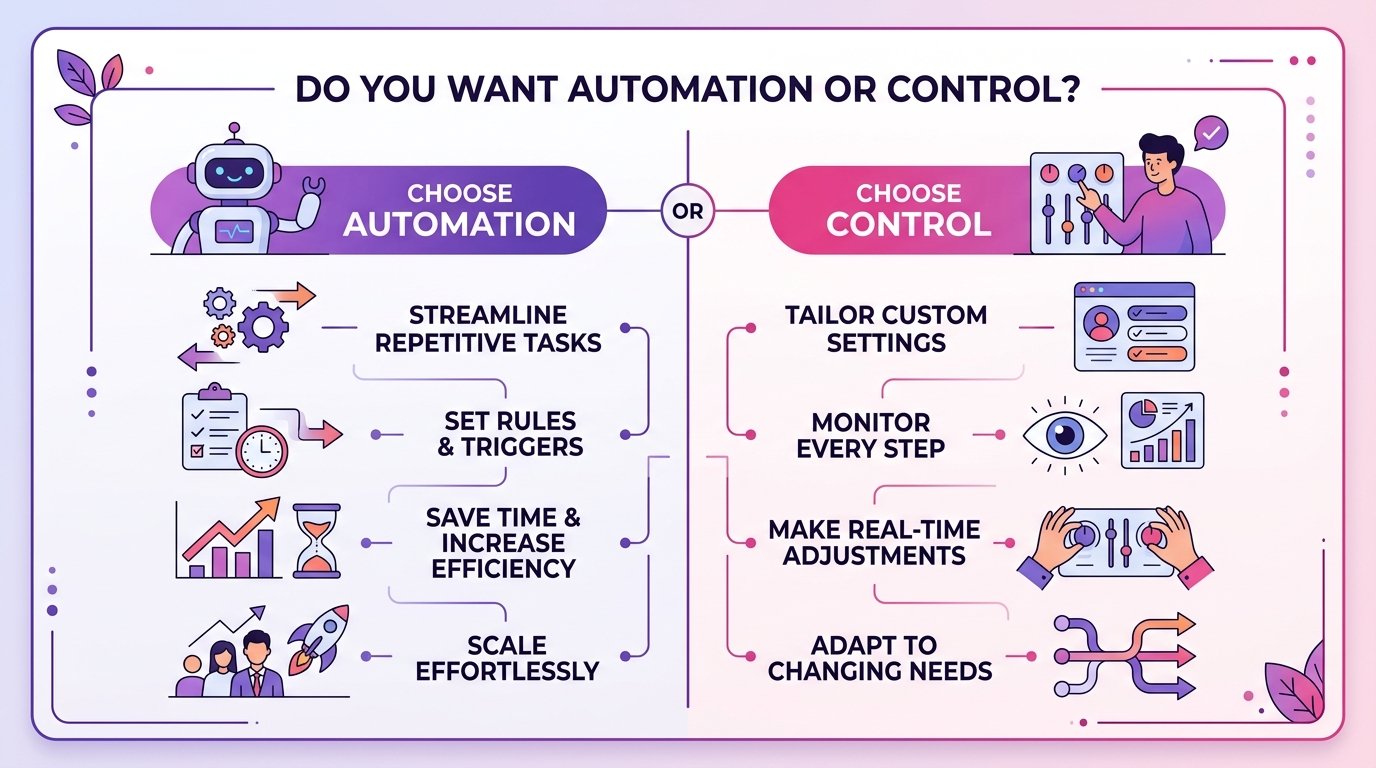
Motion leans heavily on automatic scheduling — you give it tasks and deadlines, and its algorithm decides where they actually go on your calendar, rearranging things automatically as new items come in or priorities shift. Sunsama takes a more manual, intentional approach — it pulls tasks in from other tools, but you’re the one deciding, each morning, what actually goes where.
Motion vs Sunsama really comes down to whether you want an algorithm making scheduling decisions for you, or a structured ritual that still keeps you in the driver’s seat. Neither approach is objectively better — they’re built for different kinds of people.
What I Actually Tested During My Month of Paying for Both
I ran both apps for four weeks, genuinely trying to use each one the way it’s meant to be used rather than half-heartedly testing features. Every task, every deadline, every meeting went into both systems in parallel.
That sounds tedious, and it was, but it’s the only way I trusted myself to form a real opinion on Motion vs Sunsama instead of just repeating whatever the marketing pages claimed.
Motion vs Sunsama: The Core Differences
Here’s how the two actually compare once you get past the marketing and into daily use.
Automatic Scheduling vs Manual Daily Planning
This is the single biggest difference, and it shapes everything else about how each app feels to use — really the heart of the whole Motion vs Sunsama decision. Motion takes your task list and deadlines and automatically slots them into open calendar time, rearranging the plan whenever something new comes in or a meeting gets added.
Sunsama instead gives you a daily planning ritual — each morning, you review everything pulled in from your task apps, email, and calendar, and manually decide what actually fits into today. Nothing gets scheduled without you actively placing it there.
During my test, Motion’s automation genuinely saved time on reactive days — when new tasks kept appearing, I didn’t have to manually replan constantly. But on days where I had a very specific sense of priority, Motion’s algorithm sometimes made scheduling choices I wouldn’t have made myself, and unwinding those decisions took almost as long as manual planning would have.
Integration With Other Tools
Sunsama pulls tasks directly from Trello, Asana, ClickUp, Todoist, Jira, and several other tools into one unified daily view, without requiring you to migrate your actual task management elsewhere. This matters enormously if your team already has an established project management system you can’t just abandon, and it’s a major factor tipping Motion vs Sunsama toward Sunsama for established teams.
Motion has its own built-in task and project management, and while it does integrate with some external calendars and a handful of tools, it leans more toward being a replacement system rather than a layer sitting on top of what you already use.

Meeting and Calendar Handling
Both apps sync with Google Calendar and Outlook reasonably well, so meetings show up correctly in either system. Where they differ is how they treat your actual task time around those meetings — one of the quieter but genuinely important dimensions of Motion vs Sunsama.
Motion automatically finds and protects gaps between meetings for your task work, rescheduling tasks on the fly if a new meeting gets added mid-day. Sunsama shows you the same gaps but expects you to decide what goes in them yourself, which felt slower some mornings but more accurate to what I actually wanted to prioritize on others.
Team and Collaboration Features
Motion offers team scheduling features, including automatically finding meeting times across a team’s calendars and distributing project tasks among team members. For a small team specifically needing automated coordination, this is a genuine advantage Sunsama doesn’t really compete with directly, and it’s worth weighing heavily if team scheduling is the deciding factor in Motion vs Sunsama for you.
Sunsama is more built around individual daily planning, even though teams can use it collectively — it doesn’t try to automate team-wide scheduling decisions the way Motion does.
Pricing
Motion runs noticeably more expensive than Sunsama at the individual level, reflecting its heavier automation and built-in project management. Sunsama’s pricing sits a bit lower for solo use, though both apps land solidly in the “genuinely expensive for a calendar tool” range compared to something like a free Google Calendar setup. This price gap alone is worth weighing heavily in any Motion vs Sunsama decision, especially for a solo freelancer.
Neither offers a permanently free tier, though both provide trial periods long enough to actually test real workflows before committing — which is exactly what I’d recommend doing before either subscription, rather than trusting a single review, including this one.
Learning Curve
Sunsama’s daily planning ritual is intuitive almost immediately — review what’s pulled in, drag it into today, done. Motion has a steeper initial learning curve, mostly because understanding why its algorithm made specific scheduling choices takes some getting used to, and building trust in the automation takes longer than learning Sunsama’s more manual interface. This learning curve gap is another practical factor worth weighing in Motion vs Sunsama beyond just price and features.
Step-by-Step: Figuring Out Which One Actually Fits Your Workflow
This is the exact process I’d walk someone through to actually resolve Motion vs Sunsama for their own habits, rather than picking based on marketing.
Step 1: Identify whether you want automation or control. If reactive rescheduling throughout the day genuinely stresses you out, Motion’s automatic approach solves that directly. If you want to make every scheduling decision yourself, Sunsama’s manual ritual fits better.
Step 2: Check whether you already have an established task management tool. If your team runs on Trello, Asana, or Jira and switching isn’t realistic, Sunsama’s integration-first approach avoids a painful migration. Motion works best when you’re willing to consolidate into its own system.
Step 3: Consider whether you need team-wide scheduling automation. For solo work, this matters less. For a small team constantly negotiating meeting times, Motion’s team features are a genuine advantage worth the higher price.
Step 4: Try both free trials with real, current work, not test tasks. This is exactly what settled Motion vs Sunsama for me. Fake test tasks don’t reveal how an app actually handles the messiness of a real week.
Step 5: Pay attention to whether you trust the automation or fight it. By the end of my trial month, I noticed I was quietly overriding Motion’s scheduling decisions constantly, which told me my actual preference more clearly than any feature list could, and it’s really the tiebreaker I’d suggest anyone use for Motion vs Sunsama.
Real Examples of People Choosing Between These Tools
These examples show how differently people actually resolve Motion vs Sunsama once they test both against their real workload.
A solo consultant I know picked Motion specifically because her days are constantly reactive — new client calls get booked last-minute, and she needed something that automatically reshuffled her task time without her manually replanning every time a meeting appeared. The automation genuinely fit her actual daily chaos.
A small design agency I’ve worked with chose Sunsama instead, specifically because their whole team was already deeply invested in Asana for project tracking, and Sunsama let them keep that system while adding a unified daily planning layer on top, rather than migrating everything into Motion’s own task structure. That integration factor alone settled Motion vs Sunsama for their situation.
I personally landed on Sunsama after my month of paying for both, mostly because I realized I didn’t actually want an algorithm making scheduling calls for me — I wanted a faster, more structured version of the manual planning I was already doing, which is exactly what Sunsama’s daily ritual provides, and exactly why my own Motion vs Sunsama verdict landed the way it did.
Common Mistakes People Make Choosing Between Motion and Sunsama
Nearly every regretted choice I’ve seen comes down to one of these five mistakes when weighing Motion vs Sunsama.
Mistake 1: Picking based on which one has better marketing videos. Both apps have slick demo content that makes the automation look effortless. Real daily use, with your actual messy task list, tells a very different story than a polished demo.
Mistake 2: Ignoring your existing tool stack. If switching away from your current project management system isn’t realistic for your team, that constraint should shape the decision more than either app’s individual feature list.
Mistake 3: Underestimating the cost over a full year. Motion vs Sunsama isn’t just a monthly decision — multiply the price difference by twelve months before committing, especially for a solo freelancer watching every subscription closely.
Mistake 4: Not testing with real, current work during the trial. Fake test tasks never reveal how an app handles genuine last-minute chaos. Use your actual week, not a hypothetical one, during any trial period.
Mistake 5: Assuming more automation is always better. Motion’s automatic scheduling is genuinely impressive engineering, but impressive isn’t the same as right for your specific workflow. Some people work better staying in manual control — a distinction that matters more in Motion vs Sunsama than any spec sheet comparison ever will.
My Actual Calendar Setup Today
Here’s what I run now, after that expensive month of paying for both apps side by side and settling my own personal verdict on Motion vs Sunsama:
- Sunsama — my daily planning ritual, pulling tasks in from Todoist each morning
- Google Calendar — the underlying calendar both apps sync against, which I’ve written more about in my guide to using Google Calendar to boost productivity
- Todoist — task capture throughout the day, feeding into Sunsama’s morning review, the same setup I covered in my comparison of Todoist and TickTick
A manual-first setup, not because Motion is worse, but because I personally wanted to stay the one making scheduling decisions rather than handing that off to an algorithm.
Final Thoughts
Motion vs Sunsama isn’t a competition with one universally correct winner — it’s a genuine fork between wanting an algorithm to handle your scheduling automatically versus wanting a faster, more structured version of planning your own day manually. My month of paying for both settled it for my specific habits, but that doesn’t mean it’ll settle it the same way for yours.
Try both free trials with real, current work before committing to either. Pay attention to whether you’re fighting the automation or genuinely trusting it. Factor in your existing tools, not just each app’s individual feature list, since a painful migration can outweigh whatever the app itself does well.
That expensive month of double-paying taught me something worth the cost in the end — the “better” AI calendar tool in the Motion vs Sunsama debate was never going to be settled by a features page. It only became clear once I noticed which one I was quietly overriding and which one actually matched how I wanted to plan my days.