
HTML to Markdown Online
Turn a web page or a chunk of HTML into clean Markdown for your docs, README, or wiki — free in your browser, with no app and no upload. This html to markdown online keeps your headings, lists, links, and code, and drops the styling you do not need.
Size
Nothing converted yet.
Paste your HTML, then press Convert to Markdown. Nothing is uploaded.
Complex layouts and styling do not carry over to Markdown.
Why Use This HTML to Markdown Online?
Markdown is where documentation lives: README files, wikis, help centres, and static sites all speak it. But a lot of content starts life as HTML — copied from a web page, exported from a word processor, or written in an editor that only saves HTML. Moving that content by hand means retyping every heading, link, and list, and one missed tag can break the whole page. An html to markdown online does the move in one click, turning the tags into the short Markdown marks that mean the same thing.
The other half of the job is keeping the structure. A page is not just words: the headings show what matters, the lists show the steps, and the links point to the sources. A good conversion keeps all of that in the right order, so the Markdown reads like the page it came from instead of a flat wall of text. This tool walks the document block by block, so a heading stays a heading, a list stays a list, and a code block stays a code block.
Privacy matters here too: this html to markdown online runs entirely in your browser, so your content never leaves your device — handy when the page holds draft docs or internal notes that are not yours to share. There is no account, no sign-in, and nothing to upload. It sits in our Developer Tools collection for every docs job, from a quick README fix to a full site migration.
How to Use This HTML to Markdown Online in 4 Steps
- Paste your HTML. Copy your markup into the input box in this html to markdown online — a whole page, or just the part you want to convert.
- Press Convert to Markdown. The tool parses the HTML in your browser and walks it block by block, turning each tag into its Markdown mark.
- Check the result. The page shows the size before and after, and the Markdown is ready to read, so you can see at a glance whether the headings and lists came out right.
- Copy or download. Copy the Markdown to paste into your docs, or download it as a .md file.
HTML to Markdown Online: How Conversion Actually Works
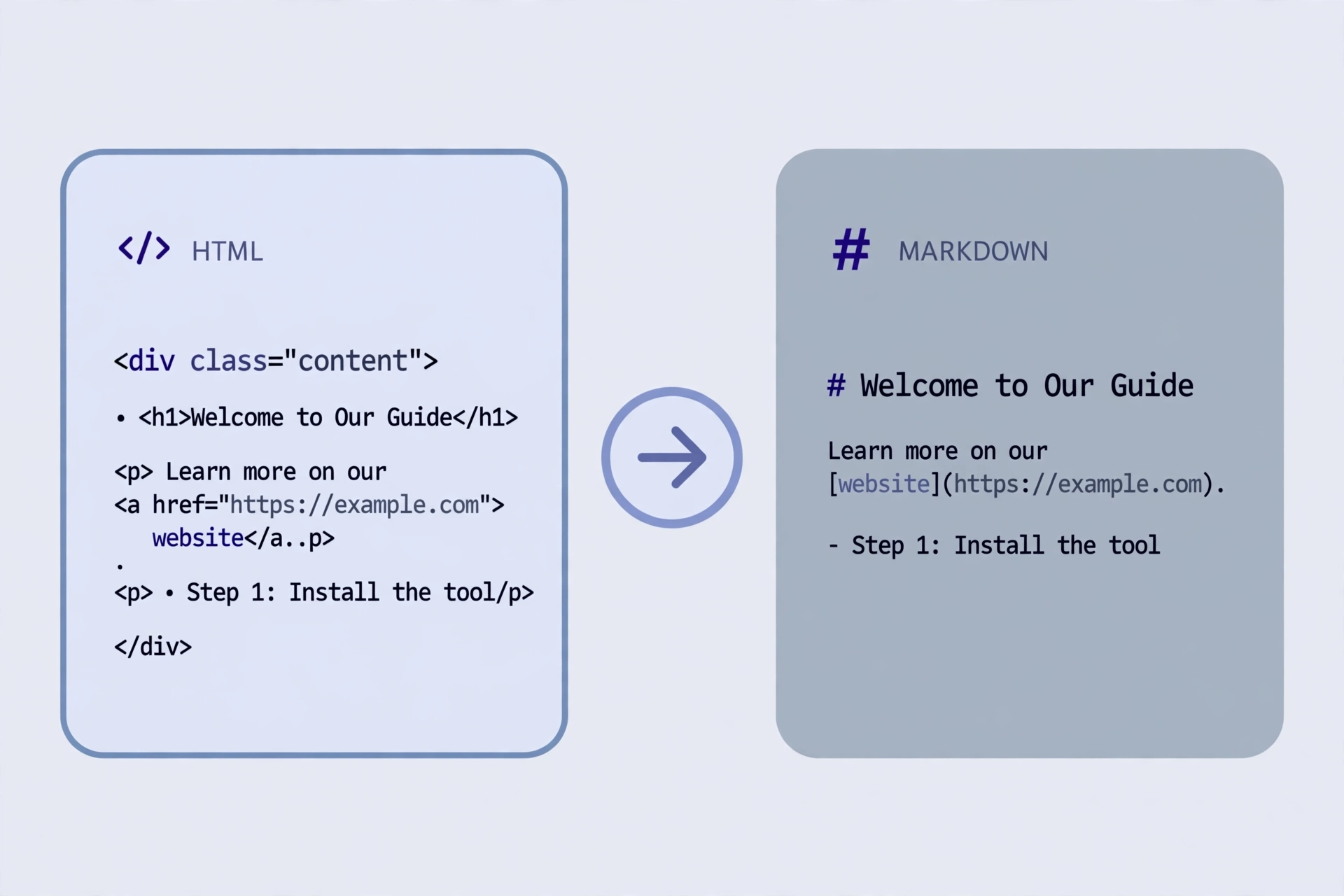
Conversion starts with parsing. The browser's own HTML parser reads the markup the same way any browser would: it builds the document tree, fixes up missing tags, and drops scripts and styles. Then the converter walks that tree block by block. A heading becomes a line of hashes, a paragraph becomes plain text, a list item becomes a dash or a number, and a table becomes rows of pipes. This html to markdown online follows those rules for the whole document, so a page with headings, lists, and a table comes out as clean, readable Markdown.
Inline marks need the same care. Bold text becomes double asterisks, italic becomes single asterisks, and a link becomes square brackets around the text with the address in round brackets. Images become the same shape with a bang at the front and their alt text in the brackets, and code becomes backticks — one pair for a word, three for a whole block. This html to markdown online handles nested marks too, so a bold link inside a list item still comes out as a bold link inside a list item.
What the tool does not do is carry over layout or styling. Markdown has no columns, colours, or fonts, so a page that relies on design will come out plain — the words and the structure survive, the look does not. Tables with merged cells and deeply nested layouts are simplified, and anything the converter cannot map is left as plain text. For the Markdown marks themselves — headings, links, lists, and tables — see the Markdown Guide basic syntax.
HTML to Markdown Online vs Other Ways to Write Markdown
| Method | Needs installing | Keeps headings | Keeps tables | Best for |
|---|---|---|---|---|
| This html to markdown online | No | Yes | Yes | A quick conversion in the browser |
| A Markdown editor | Yes | Yes | Yes | Writing Markdown every day |
| An online converter that uploads | No | Yes | Yes | Nothing — it uploads your content |
| Rewriting by hand | No | Yes | Yes | Tiny snippets only |
For a page you want in Markdown right now, without installing anything or uploading your content, this tool is the simplest choice.
Everyday Scenarios for This HTML to Markdown Online
Moving a help article to a wiki with this html to markdown online
Your help article lives on a web page, and the team wiki only takes Markdown. Paste the page HTML in, convert it, and the headings, steps, and links arrive in the right order — you can paste the result into the wiki instead of retyping the whole article.
Writing a README from a landing page with an html to markdown online
The project page on your site already explains what the tool does, with headings and a feature list. Convert that page and the README is mostly written: trim the sales lines, keep the headings and the list, and the docs are ready to ship with the code.
Cleaning up copied web content with this html to markdown online
A page you copied from the web arrives full of divs, classes, and inline styles you do not want in your notes. Convert it here and the clutter falls away: what is left is the words, the headings, and the links, in plain Markdown you can keep.
Common Mistakes When Using an HTML to Markdown Online
The biggest mistake is expecting the Markdown to look like the web page. Markdown is plain text with a few marks — it has no colours, no columns, and no fonts — so a page that depends on design will come out looking bare. That is the format working as intended, not a failed conversion: the content survived, the styling did not, because Markdown has nowhere to put it.
The second mistake is converting a whole site template instead of the content. A full page includes the header, the navigation, and the footer, and all of that lands in the Markdown too. Paste only the article or the section you want, and the result stays clean. The third mistake is never previewing the result: paste the Markdown into a preview once, and a broken table or a lost link shows up before your readers find it.
HTML to Markdown Online: Frequently Asked Questions
No. This html to markdown online runs entirely in your browser. The HTML you paste is used only on your own device and is never uploaded, stored, or sent to a server.
It converts headings, paragraphs, bold and italic text, links, images, ordered and unordered lists, blockquotes, inline code and code blocks, and basic tables. Scripts and styles are left out.
The words and the structure carry over, but the styling does not. Markdown has no colours, fonts, or layouts, so a page that relies on design will come out plain. Check the result in a Markdown preview before using it.
Simple tables become Markdown tables with a header row and a separator line. Images become Markdown image links with their alt text, and the image address stays the same, so the image must still be online to show.
It contains the same Markdown shown in the output box, saved as a .md file, ready to paste into a README, a wiki, or a docs site.
In short, this html to markdown online is the fast, private way to turn any HTML into clean Markdown — paste it in, convert it, and take the Markdown away.