
Three months into working from my spare bedroom, I finally admitted something embarrassing: I was getting less done at home than I ever did at the office, and my back hurt constantly. My “home office” was a laptop balanced on a wobbly IKEA desk, a dining chair that looked nice but destroyed my posture, and a Wi-Fi router two rooms away that dropped calls right in the middle of important meetings.
Sound familiar? If you’ve ever tried to “just work from the kitchen table for now” and ended up stuck there for two years, this one’s for you. I went through a lot of trial and error (and a few wasted purchases) before I actually built a home office that helped me focus instead of fighting me all day. Here’s everything I wish someone had told me on day one. If you’re also rethinking your software stack for working from home, I put together a full breakdown of the best apps for remote work in 2026 that pairs nicely with this setup.
Why Most Home Offices Fail Before They Even Start
The biggest mistake I made early on was treating my home office like an afterthought. I figured a laptop and a corner of the room was enough. It wasn’t.
A home office isn’t just a place where your laptop happens to sit. It’s a system — lighting, sound, seating, internet, and mental boundaries all working together. Miss one piece and the whole thing falls apart, usually around 2pm when your neck hurts and you can’t remember what you were doing before that Slack notification popped up.
Once I started treating my setup like an actual system instead of a random corner, everything changed. Here’s how I’d do it if I were starting from scratch.
Step 1: Pick a Spot You Can Mentally “Leave”
Before buying anything, figure out where your home office is actually going to live. This matters more than people think.
I first tried working from my couch. Big mistake. My brain started associating relaxing with work, and I couldn’t unwind in the evening because the couch now meant “deadline stress.”
If you have a spare room, use it, even if it’s small. If you don’t, section off a corner with a bookshelf or a room divider. The goal is a space you can physically walk away from at the end of the day. That small boundary does more for your focus than any productivity app ever will.
Step 2: Get a Real Desk and Chair (Seriously, Don’t Skip This)
I held off on buying a proper chair for almost a year because I thought it was an unnecessary expense. Then I got a mild case of tendinitis from typing at the wrong height, and suddenly a $300 chair looked like a bargain compared to physical therapy bills.
Here’s what actually made a difference for me:
- A desk at the right height — your elbows should sit at roughly 90 degrees when typing.
- A chair with lumbar support and adjustable height. I use a Steelcase Series 1, but even a mid-range ergonomic chair from Autonomous or Branch works fine.
- A monitor raised to eye level, so you’re not hunching forward all day. A $20 monitor stand fixed years of neck strain for me.
You don’t need to spend a fortune here. But your body pays the price if you cheap out on the two things you touch for eight hours a day. If you want to nerd out on the science behind it, OSHA’s computer workstation ergonomics guide is a solid, no-nonsense reference.
Step 3: Fix Your Internet Before You Fix Anything Else
This one sounds obvious, but I underestimated it badly. My home office was upstairs, and the router was downstairs in the living room. Every important call had at least one moment of frozen video and someone asking, “Wait, can you hear me?”
I ended up getting a mesh Wi-Fi system (I use Eero, but TP-Link Deco is another solid option), and it fixed the problem completely. If mesh systems feel like overkill for your space, even a simple Wi-Fi extender or running an ethernet cable to your desk can make a noticeable difference.
A productive home office means nothing if your internet keeps cutting out mid-presentation.
Step 4: Get the Lighting Right
I didn’t realize how much bad lighting was draining my energy until I moved my desk next to a window. Natural light genuinely changes how alert you feel during the day.
If natural light isn’t an option, invest in a decent desk lamp with adjustable warmth. I use a BenQ ScreenBar, which clips onto my monitor and lights my desk without creating glare on the screen. It sounds like a small thing, but it noticeably cut down my end-of-day eye strain.
Avoid sitting with a window directly behind you if you’re on video calls a lot. You’ll end up looking like a silhouette, and I learned that the hard way during an entire client call.
Step 5: Tame the Noise
If you live with roommates, kids, or a dog that barks at every delivery truck, noise will wreck your focus faster than anything else.
A pair of noise-cancelling headphones was honestly one of the best purchases I made for my home office. I use Sony WH-1000XM5s, but even budget options from Anker or JBL do a decent job of blocking distractions.
For deep focus work, I also lean on background noise apps like Noisli or just a simple lo-fi playlist. It’s not about silence — it’s about consistent, predictable sound instead of random interruptions.
Step 6: Organize for Fewer Decisions, Not More Storage
When I first set up my home office, I bought a bunch of organizers and drawer units, thinking more storage would equal more order. Instead, I just had more places to lose things.
What actually worked was keeping my desk almost empty. Laptop, one notebook, a pen, and a water bottle. Everything else — chargers, documents, backup gear — lives in one drawer, not scattered across five organizers.
A clean desk isn’t about looking Instagram-worthy. It’s about reducing the number of tiny decisions your brain makes before it can actually start working. I’ve also started leaning on AI to handle some of that mental load — I wrote about exactly how in how to use AI to organize your work life.
Step 7: Set Boundaries That Aren’t Just About the Room
A well-designed home office won’t save you if you’re answering emails at 10pm from bed. I had to set actual rules for myself:
- Work stays in the home office space, not the bedroom or couch.
- I close my laptop at a set time, even if I want to “just finish one more thing.”
- I use a simple sign on my door (yes, really) so my family knows when I’m in a meeting.
These boundaries protect your home office setup from turning into a 24/7 open-door policy for work. If you’re freelancing and boundaries feel especially hard to hold onto, my freelance project management guide digs into how I stopped the chaos of always being “available.”
Common Mistakes I Made (So You Don’t Have To)
- Buying gadgets before fixing basics. I bought a fancy desk lamp before I even had a proper chair. Fix ergonomics first.
- Ignoring cable management. A tangled mess of cords under your desk is a bigger productivity killer than it sounds. A $15 cable tray solved this instantly.
- Working in the same spot I relax in. This blurred every boundary between “on” and “off” time.
- Skipping breaks because I was “already home.” Working from a home office doesn’t mean working nonstop. I now set a timer every 90 minutes to stand up and stretch.
- Underestimating plants and small personal touches. A couple of plants and a photo on my desk made the space feel less like a cubicle and more like somewhere I actually wanted to sit.
A Few Real Examples From My Own Setup
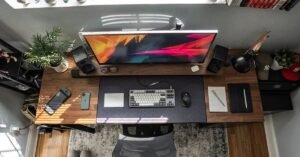
My current home office is nothing fancy: a 4-foot desk, one monitor, a mesh Wi-Fi pod on the shelf, a lamp with warm lighting, and noise-cancelling headphones hanging on a hook. Total cost over time was maybe $600, spread out across several months instead of one big purchase.
A friend of mine works from a tiny apartment and built her entire home office inside a closet with the doors removed. She added a fold-down desk, a clip-on light, and a small fan for airflow. It’s proof that a productive home office doesn’t need a spare room — it needs intention.
Related Reads
- Best Apps for Remote Work in 2026
- Freelance Project Management: How to Stop the Chaos and Stay on Top
- How to Use AI to Organize Your Work Life
Final Thoughts
Setting up a home office isn’t a one-weekend project, and honestly, mine is still evolving. What made the real difference wasn’t buying the most expensive gear — it was fixing one problem at a time: first the chair, then the internet, then the lighting, then the boundaries.
Start with whatever is bothering you the most right now. If your back hurts, fix the chair. If your calls keep dropping, fix the Wi-Fi. If you can’t focus, fix the noise. Small, deliberate changes add up to a home office that actually works for you, instead of one you’re constantly fighting against.